- Новости
- ИССЛЕДОВАТЬ
- Страницы
- Группы
- Мероприятия
- Reels
- Статьи пользователей
- Маркет
- Funding
- Offers
- Jobs
- Courses
- Форумы
- Кинозал
- Игры
- Разработчики
- Merits
-
 Babarun (BBRN)
-
 Collab Influenceurs
-
 Coupon
-
 Procaly
-
 Récompenses
-
 Événementiels
-
 Parrainage
-
 Calculez vos calories
-
 Affiliation Matrice 3x9
-
 La silver économie
-
 Maps Membres
-
 BabaShopCenter
-
 Bot IA de Trading
-
 Runsound music
-
 Films partner IMDb
-
 Affiliation
-
 Prêts Immobiliers
The Eevee Ray Tracing Hack That Shouldn’t Exist: Unlocking Indirect Lighting in Blender
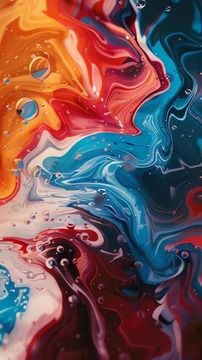
blender, Eevee, ray tracing, indirect lighting control, Gleb Alexandrov, 3D rendering, Blender tutorial, lighting techniques, digital art, game design
## Introduction
In the realm of 3D rendering, achieving stunning visuals often hinges on the subtle interplay of light and shadow. For many artists and developers using Blender, the Eevee render engine offers a powerful yet user-friendly platform for real-time rendering. However, one of the persistent challenges has been the limited control over indirect lighting—an essential element for creating realistic scenes. Fortunately, Gleb Alexandrov has unveiled a remarkable workaround that allows users to manipulate the intensity of ray-traced bounced light in Eevee. In this article, we delve into this innovative hack, exploring how it can elevate your Blender projects to new heights.
## Understanding Eevee and Its Lighting Limitations
Eevee is celebrated for its speed and efficiency, making it a favorite among 3D artists looking for quick render times without sacrificing quality. However, its functionality does come with certain limitations, particularly when it comes to indirect lighting. Unlike Blender's Cycles engine, which provides extensive options for light bounces and global illumination, Eevee's settings are somewhat restrictive, leaving users wanting more control over how light interacts within a scene.
Indirect lighting is crucial for establishing mood and depth in 3D environments. It simulates how light reflects off surfaces and illuminates darker areas, which is vital for creating immersive experiences. The lack of options for fine-tuning this aspect in Eevee has often led users to compromise on their artistic vision.
## The Ray Tracing Hack Explained
Gleb Alexandrov's tutorial, "The Eevee Ray Tracing Hack That Shouldn’t Exist," presents a straightforward yet effective solution. By employing this method, users can unlock a hidden layer of control over indirect lighting, allowing for the adjustment of ray-traced bounced light intensity—something that is not readily available in the standard settings.
### Step-by-Step Guide to Implementing the Hack
1. **Setting Up Your Scene**: Begin by creating your 3D scene in Blender using Eevee. Ensure you have your lighting and materials in place before proceeding to the next steps.
2. **Enabling Ray Tracing Features**: Although Eevee does not officially support ray tracing in the same manner as Cycles, you can mimic the effect by using a combination of settings. Open the Render Properties panel and ensure that the Screen Space Reflections option is enabled. This will set the stage for the hack.
3. **Adjusting Light Bounces**: The magic happens when you manipulate the World properties. In the World tab, find the Indirect Lighting settings. Here, you'll need to increase the Indirect Lighting intensity to create the desired bounce effect. However, keep in mind that this is just the beginning.
4. **Using Light Probes**: To further enhance your indirect lighting, you can add light probes to your scene. Place reflection and irradiance probes strategically to capture how light interacts with different surfaces. This step is crucial for achieving more realistic lighting responses.
5. **Fine-Tuning the Effect**: After setting up the probes, head back to the World properties and tweak the values until you achieve a satisfying balance. You may need to experiment with the settings to see how they influence the overall lighting in your scene.
### Tips for Optimizing Your Render
While the hack provides greater control over indirect lighting, there are additional strategies you can implement to optimize your renders in Eevee:
- **Material Settings**: Review your material settings to ensure they complement the lighting adjustments. Use shaders that reflect light realistically and enhance the overall visual quality.
- **Scene Composition**: Pay attention to how objects are arranged in your scene. The placement of light sources, reflective surfaces, and materials can greatly impact the effectiveness of indirect lighting.
- **Render Quality Settings**: Adjust the sampling settings in the Render Properties. Higher samples can lead to better quality but will increase render times. Find a balance that works best for your project.
## Conclusion
The Eevee ray tracing hack that Gleb Alexandrov has introduced is a game-changer for 3D artists working in Blender. By unlocking control over indirect lighting, users can create more dynamic and engaging scenes that resonate with viewers. While Blender’s Eevee render engine is known for its speed, this innovative workaround enables artists to push the boundaries of what is possible in real-time rendering.
As the demand for high-quality visuals continues to rise in various industries, mastering techniques like this will be crucial for artists seeking to elevate their craft. With the right knowledge and tools, you can transform your projects and create stunning 3D art that stands out in a competitive landscape. Embrace this hack, explore its potential, and let your creativity shine in every render.
Source: https://www.blendernation.com/2025/12/19/the-eevee-ray-tracing-hack-that-shouldnt-exist/
Спонсоры
Спонсоры
- Alimentation - Produits
- Actualité
- Associations
- Bricolage
- Beauté & Parfum
- Causes
- Culture
- Cuisines - Recettes
- Climat
- Coiffure
- Divulgation
- Образование
- Esotérisme
- Entreprises
- Emplois
- Energies
- Évènements
- Films et animations
- Finance - Investissement
- Formations & Cours
- Gouvernement
- Histoire et faits
- Internet
- Informatique
- Images
- Jeux
- Jardinage
- Justice
- Maison - Jardin
- Musique
- Mode
- Manifestation - Covid
- Mystère
- Marketing
- Nouveau Ordre Mondial
- Politique
- Photographie
- Théâtre
- Religion
- Santé - Bien-être
- Social & Networking
- Shopping
- Sports
- Spiritualité - Religions
- Sécurité
- Science
- Son & Hi-Fi
- Services de rencontres
- Technologies
- Téléphone & Smartphone
- Vêtements - Accessoires
- Voyage & Tourisme
- Autres
© 2025 Babafig
 Russian
Russian
 English
 Arabic
 Français
 Spanish
 Portuguese
 Deutsch
 Turkish
 Dutch
Dutch
 Italiano
 Romaian
 Portuguese (Brazil)
 Greek
Greek
 Réunionnais
 India
India
Connexion
Babarun (BBRN)
Collab Influenceurs
Événementiels
Parrainage
Affiliation Matrice 3x9
Appel pour rendez-vous de 15 minutes
Liste complète des emoticones à copier coller
Aprann le kreol
Maps Membres
Apprendre la langue Réunionnaise
Runsound music
Mentions légales
Films partner IMDb
A propos
Условия использования
Confidentialité
Свяжитесь с нами
Support Center
Каталог
