


Every team has had the same conversation twice: "Didn't we already decide this?" Decisions get made in meetings, but memory fades, notes are patchy and recordings are too long to rewatch. A transcript fixes much of this by turning spoken discussion into text that anyone can search, skim and share. This article explains how teams and small businesses can use Noscribe an AI speech-to-text service, to build a simple, searchable record of their conversations.
Why Transcribe Meetings?
- Fewer lost decisions. A searchable record makes it easy to check what was agreed and who agreed to it.
- Faster onboarding. New colleagues can read past discussions instead of asking everyone to repeat themselves.
- Better notes without a dedicated note-taker. Participants can focus on the conversation instead of typing.
- Easier follow-up. Action items can be pulled from the text and turned into tasks.
- Accessibility. Written transcripts help colleagues who are hard of hearing, who work in a second language or who missed the call.
How NoScribe Works
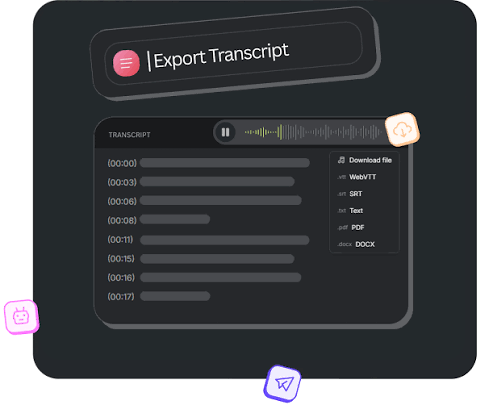
NoScribe is a web service. You upload an audio or video file, choose the language, optionally enable speaker identification, and get an editable transcript within minutes. It accepts common formats such as MP3, WAV, FLAC, M4A, MP4, MOV and AVI, so a recording exported from a video call platform can usually be uploaded as it is. Transcripts can be exported as TXT, DOCX, PDF, SRT or VTT, with timestamps and speaker labels where applicable.
Features That Matter for Teams
Speaker Identification
In a meeting, who said something is often as important as what was said. NoScribe's diarization labels voices as Speaker A, Speaker B and so on. You can let it detect the number of speakers automatically or set an expected number from 2 to 10. After transcription, replace the generic labels with real names in the editor. The company notes that this works best when people do not talk over one another, which is a good habit in meetings anyway.
Multiple File Uploads
The Pro and Business plans list multiple file uploads, which helps when you want to process a batch of recordings, such as a week of stand-ups or a series of customer interviews.
Large File Limits
Long video recordings can be big. The free plan allows files of up to 100 MB, Pro allows up to 5 GB and Business up to 10 GB, so teams working with full-length video meetings or webinars will likely need a paid plan.
100+ Languages
NoScribe lists support for more than 100 languages and dialects, with automatic language detection or manual selection, and a transcript translation feature on its plans. International teams can transcribe calls held in different languages. As always, anything translated that will be shared externally should be checked by a fluent speaker.
A Simple Meeting Transcription Workflow
- Get consent. Tell participants that the meeting is being recorded and transcribed, and follow your organization's policies and local laws.
- Record with good audio. Use a decent microphone or headset, ask people to speak one at a time and keep background noise low.
- Upload the recording to NoScribe and select the language.
- Turn on speaker identification and set the expected number of speakers if you know it.
- Review the transcript. Fix names, product terms, figures and dates in the built-in editor.
- Export in the right format. Use DOCX or PDF for sharing, TXT for pasting into a wiki or project tool, and SRT or VTT if you are adding captions to a recorded presentation or training video.
- Extract action items. Add a short summary at the top listing decisions, owners and deadlines.
- Store it somewhere shared. Save the final version in your team's usual documentation space so it is easy to find.
Other Team Uses
- Customer and user interviews: Search across transcripts for recurring themes and quotes.
- Training and webinars: Turn recordings into captions, handouts and written guides.
- Sales and support calls: Review conversations to improve scripts and spot common questions.
- Workshops and brainstorming sessions: Capture ideas that would otherwise be lost.
- Interview-based content: Turn discussions into articles, newsletters and case studies.
Accuracy and Review
NoScribe's website advertises 99% accuracy, while its FAQ gives a range of 95 to 99% depending on audio quality, accents and background noise. For team records, that means a quick review is worthwhile, especially for anything with legal, financial or contractual implications. Treat the AI transcript as a strong first draft rather than an official minute.
Costs
NoScribe measures usage in credits, where one credit equals one minute of audio or video. A team that holds ten one-hour meetings per month would use about 600 credits, well inside the 3,000 monthly credits of the Pro plan, which the site equates to roughly 50 hours. The Business plan offers 6,000 credits per month (about 100 hours), 10 GB per file and 1 TB of storage. New users can try the service with 300 free credits, and one-time credit packs with lifetime validity are available for teams with uneven workloads. Monthly credits reset each billing cycle, so unused minutes do not roll over, and the free plan appears to include a watermark on exports.
Privacy and Compliance
Meetings often include sensitive information such as financial figures, personnel matters and client details. NoScribe says files are encrypted during upload and processing, and its FAQ says audio and transcripts are not stored on its servers after processing, although its plans also advertise encrypted cloud storage. Before adopting any transcription tool, have your IT or legal team review the privacy policy, especially if you are subject to industry regulations or data-residency rules. Also decide in advance who can access transcripts and how long you will keep them.
Final Thoughts
Transcripts will not make meetings shorter, but they make them far more useful afterwards. By turning recordings into searchable text, a team can keep decisions, share context and spend less time asking what was said. NoScribe offers a quick, approachable way to start, and its free allowance means a team can try it on a real meeting before committing to anything.